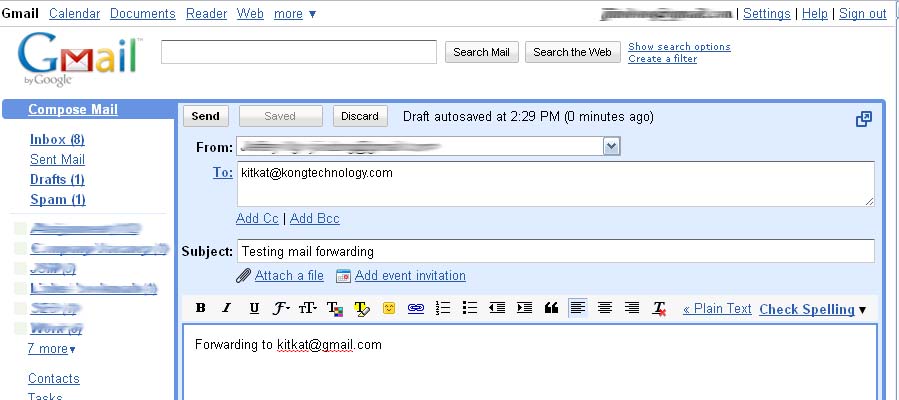
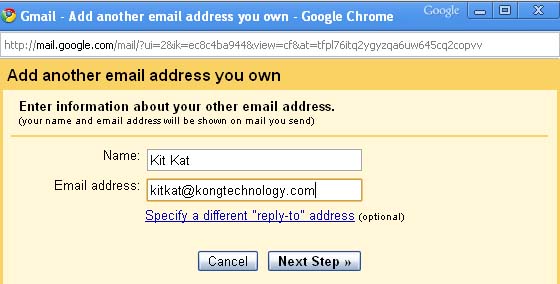
Forwarding Your Web Mail and Send Mail As function using Gmail Posted: 17 Feb 2010 07:56 PM PST Tired of your company webmail? Hate the webmail interface of Horde, SquirrelMail and RoundCube? Troublesome to check several email accounts everyday? Thanks to mail forwarding, there is a way to manage all your email account under one roof and the best way to do it, is by using your Gmail account. First login to your CPanel webmail, (**Demonstration is based on CPanel 11, interface / features in older CPanel version may be variant.) Click on Forwarding Options and you'll be directed to the page below, Click on Add Forwarder. Then type in the email address that you wish to receive the emails and press Add Forwarder. When it's successful, successful message will appear like this, And you're done! Now, let's test it! Using any email client, I'll send an email to kitkat@kongtechnology.com . And both of my domain email and Gmail received the same email I sent. :) Send Mail AsIf you wish to do more than receiving emails, you can also set your email client to send mail using the emails address you wished, by importing your email address into your Gmail account. (Demonstration is based on Gmail, procedure of other email clients may be variant.) First login to your Gmail account, Click on Settings and you'll be directed to the settings page. Click on Accounts and Import tab and press "Send mail from another address" to add the email address you desired. Next, is to enter the name you wished to display when sending an email and the email address you wished to use. Press "next step" after you're done entering. Next, choose "Send through Gmail" for easier setup and head on to the next step. Click on "Send Verification" and you're almost there. Once your email address is added, a confirmation email will be sent to your domain email. Sometimes, confirmation email might get a little slow. If you did not receive the confirmation email immediately, you might need to late about 15 minutes or up to an hour! Ouch! Now, it's time check your webmail inbox. You can either click on the link above to confirm. If the link is broken, you might need to use the confirmation code for confirmation according to the steps provided by Gmail. Now, you can forget about your lousy webmail and shift to Gmail permanently. :) |






Awesome, Expensive And Rare Gucci Phones What the Next iPhone Will Have [From iPhone OS 4.0] Watch Pixels by Patrick Jean [Video]. Amazing Graphics! Awesome, Expensive And Rare Gucci Phones It is rightly been said that the first impression is the last impression and for all the style conscious people whatever they carry and whatever they wear creates a lasting impression. If you are among this gang of people who wants their style statement to be reflected in each and every possession including mobile phones, then Gucci phones proves to be an apt choice. Your stylish, attractive and gorgeous Gucci cell phone will surely make you the centre of attraction no matter wherever you may go and who knows your best pal may turn into your biggest enemy. Though all Gucci handset are amazing in their own style but we have handpicked some of the awesome pieces for you. Gucci A502 Tiny gold diamonds : This handset from Gucci is the true reflection of exquisite craftsmansh...
Comments
Post a Comment